How a simple reordering of struct fields can make your code 3x faster
It started as a “why is this stuttering?” bug.
We had a WebAR scene that was fine in the lab, but on a couple of mid-range phones the frame-time graph looked like a heartbeat - smooth, then a random spike, then smooth again. No crashes, no obvious hot function, just… jitter.
At first we blamed the usual suspects: shader compile, GC, camera texture upload, a rogue allocation. We profiled. We trimmed. We still saw spikes.
The fix ended up being embarrassingly low-level: a struct layout in a hot loop was wasting bytes, which meant fewer elements per cache line, which meant more cache misses, which meant more “waiting for memory” right when we needed consistency.
This post is about that class of bugs: the ones that don’t look like “memory bugs”, but behave like performance ghosts until you look at alignment, padding, and layout.
Now here’s the mental model I keep coming back to.
Imagine a big library where books are placed randomly. A sci-fi novel sits next to quantum physics, kids’ stories are mixed with legal textbooks. Everything is technically available - but finding related books is slow.
Now imagine the same library, but organized: physics books together, fiction together, reference books in one section. When a researcher needs ten physics books, they can grab them in one go instead of walking across the building.
That’s basically what cache locality is. Your CPU is constantly “fetching shelves” (cache lines), and your data layout decides whether each trip brings useful stuff - or padding and unrelated fields.
And the way you arrange your structs? You’re the librarian.
Let’s start with a tiny struct that “adds up” to 7 bytes, yet ends up larger.
When sizeof() Doesn’t Add Up
Here’s something strange that happens in C++:
struct Pixel {
    uint8_t r;   // 1 byte - red channel
    uint8_t g;   // 1 byte - green channel
    uint8_t b;   // 1 byte - blue channel
    int id;      // 4 bytes - pixel ID
};

int main() {
    std::cout << "Size: " << sizeof(Pixel) << " bytes\n";
    return 0;
}
Quick mental math:
1 (r) + 1 (g) + 1 (b) + 4 (id) = 7 bytesBut when you run this code, sizeof(Pixel) returns… 8 bytes.
Where did that extra byte go? 🤔
Even more mysterious-change the order of fields:
struct PixelReordered {
    int id;      // 4 bytes
    uint8_t r;   // 1 byte
    uint8_t g;   // 1 byte
    uint8_t b;   // 1 byte
};

// Same data, different order
// sizeof(PixelReordered) = ??? bytes
Still 8 bytes! But wait, try this:
struct BadPixel {
    uint8_t r;   // 1 byte
    int id;      // 4 bytes - moved to middle
    uint8_t g;   // 1 byte
    uint8_t b;   // 1 byte
};

// sizeof(BadPixel) = 12 bytes (!!)
Same three fields, same int, but now it’s 12 bytes instead of 8!
This isn’t a compiler bug. This is memory alignment at work, and understanding it is the difference between code that runs smoothly and code that wastes gigabytes of memory traffic and countless CPU cycles.
Part 1: Understanding Memory Alignment
What Your CPU Actually Sees
When you declare a struct, you imagine your data laid out sequentially, like books on a shelf:
| r | g | b | id |But here’s the truth: CPUs don’t read memory one byte at a time. They read memory in chunks, typically 4 or 8 bytes at once. It’s like grabbing multiple books off a shelf in one motion.
Think of RAM as a series of numbered boxes, but your CPU can only pick up boxes at specific addresses:
Address:  0    1    2    3    4    5    6    7    8    9    10   11
         [    Box 0    ][    Box 1    ][    Box 2    ][    Box 3    ]
If you’re a 4-byte (32-bit) CPU, you can grab:
- Box 0 (addresses 0-3)
- Box 1 (addresses 4-7)
- Box 2 (addresses 8-11)
But you can’t efficiently grab “addresses 2-5” because that spans two boxes. You’d need to:
- Grab Box 0 (addresses 0-3)
- Extract bytes 2-3
- Grab Box 1 (addresses 4-7)
- Extract bytes 4-5
- Combine them
That’s extra work. Extra instructions. Extra time.
Alignment Rule
Every data type has an alignment requirement: it must start at an address that’s a multiple of its size.
| Type | Size | Must start at addresses… |
|---|---|---|
bool | 1 byte | Any address (0, 1, 2, 3…) |
uint16_t | 2 bytes | Even addresses (0, 2, 4, 6…) |
int | 4 bytes | Multiples of 4 (0, 4, 8, 12…) |
double | 8 bytes | Multiples of 8 (0, 8, 16, 24…) |
Why? So the CPU can grab them in one clean read.
Takeaway: A 4-byte int starting at address 4 = one CPU operation. A 4-byte int starting at address 2 = multiple operations (or a hardware fault on some architectures).
Part 2: What is Padding?
Padding is invisible bytes the compiler inserts to satisfy alignment rules.
Let’s revisit our BadPixel example:
struct BadPixel {
    uint8_t r;   // 1 byte
    int id;      // 4 bytes
    uint8_t g;   // 1 byte
    uint8_t b;   // 1 byte
};
Here’s what you think is happening:
Address: 0    1    2    3    4    5    6
        [r   ][id............... ][g  ][b  ]
But here’s what actually happens:
Address: 0    1    2    3    4    5    6    7    8    9    10   11
        [r   ][PAD PAD PAD..][id................][g  ][b  ][PAD PAD..]
Why the padding?
-
After
r(address 0): We need to placeid(4 bytes). Butidmust start at a multiple of 4. Address 1 is not a multiple of 4. So the compiler adds 3 padding bytes, movingidto address 4. -
After
gandb(addresses 8-9): The struct itself needs to be aligned. If we create an array ofBadPixel, each struct must start at a multiple of its largest member’s alignment (4 bytes forint). So the compiler adds 2 bytes at the end.
Result:
Actual data: 1 + 4 + 1 + 1 = 7 bytes
Padding: 3 + 2 = 5 bytes
Total: 12 bytes
Visual Comparison
Here’s a side-by-side comparison of how these structs actually look in memory:
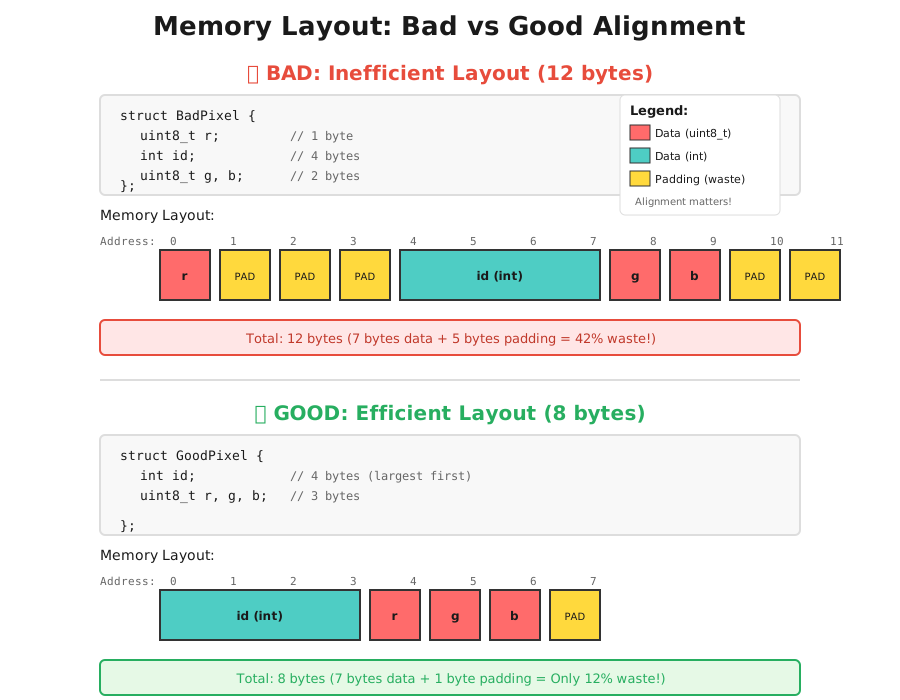
As you can see, the poorly aligned struct wastes 42% of its memory on padding, while the optimized version only wastes 12%. Same data, dramatically different memory footprint.
Padding is unused memory inserted by the compiler to ensure each struct field starts at an address compatible with its alignment requirement. The alignment requirement exists because CPUs read memory in chunks-a 4-byte int must start at an address divisible by 4 for efficient access.
Part 3: Performance Impact
“Okay,” you might think, “so I waste a few bytes. Big deal.”
Let me show you why it’s a very big deal.
Scenario: Processing 1 Million Pixels
struct BadPixel {
    uint8_t r;
    int metadata;  // Some pixel metadata
    uint8_t g;
    uint8_t b;
};  // 12 bytes per pixel

struct GoodPixel {
    int metadata;
    uint8_t r;
    uint8_t g;
    uint8_t b;
};  // 8 bytes per pixel
Memory usage for 1 million pixels:
BadPixel: 12 MBGoodPixel: 8 MB- Difference: 4 MB wasted (33% overhead!)
“Still not that much,” you say. But here’s where it gets interesting.
Real-World Example: WebAR SDK
In our AR Engine WebAR SDK, we process camera frames at 30-60 FPS. That’s 30-60 frames per second. At a typical 1920×1080 resolution, that’s roughly 2 million pixels per frame.
Do the math (order-of-magnitude):
- 5-minute AR session = 300 seconds
- At 60 FPS = 18,000 frames
- 2M pixels per frame → ~36 billion pixel-visits
Now the important part: even if you reuse buffers (say you keep a ring of 3–4 frames), the CPU still has to read/write that data every frame.
With a padded layout (12B vs 8B per pixel in our example):
- Extra 4 bytes per pixel × 2M pixels ≈ ~8 MB of extra data touched per frame
- ~8 MB × 18,000 frames ≈ ~144 GB of extra memory traffic over the session
- …which typically shows up as more cache misses and less stable frame times
Again: not 144 GB allocated - the same buffers are reused - but 144 GB worth of extra bytes moving through the CPU’s memory hierarchy (cache lines -> caches -> RAM).
In AR/VR, when you’re already close to the performance edge, this can be the difference between a stable experience and visible stutter. Users notice it immediately.
What Actually Happens in Your CPU
Modern CPUs don’t just execute instructions-they have a sophisticated memory hierarchy:
CPU Registers: ~1 cycle (instant)
    ↓
L1 Cache: ~4 cycles (nanoseconds)
    ↓
L2 Cache: ~12 cycles (tens of nanoseconds)
    ↓
L3 Cache: ~40 cycles (hundreds of nanoseconds)
    ↓
RAM: ~200 cycles (microseconds)
Think of this like:
- CPU Registers: Book you’re currently reading (in your hands)
- L1 Cache: Your desk (arm’s reach)
- L2 Cache: Your bookshelf (walk across room)
- L3 Cache: Your office library (down the hall)
- RAM: City library (drive across town)
When you process pixels, the CPU tries to fit as many as possible into its cache (the “desk”).
With GoodPixel (8 bytes each):
- A typical 64-byte cache line holds 8 pixels
With BadPixel (12 bytes each):
- A 64-byte cache line holds 5 pixels (only 60 bytes used efficiently)
That’s 37% fewer pixels per cache line. More cache misses. More trips to RAM. Slower code.
Part 4: Benchmark (Seeing is Believing)
Let’s write actual code to measure this. We’ll perform a simple operation: convert pixels to grayscale.
Grayscale formula:
gray = 0.299 * r + 0.587 * g + 0.114 * bCode
#include <iostream>
#include <chrono>
#include <vector>
#include <cstdint>
#include <iomanip>

// BAD: Poorly aligned struct (12 bytes)
struct BadPixel {
    uint8_t r;
    int id;
    uint8_t g;
    uint8_t b;
};

// GOOD: Optimized struct (8 bytes)
struct GoodPixel {
    int id;
    uint8_t r;
    uint8_t g;
    uint8_t b;
};

// Convert to grayscale (bad pixel version)
void processGrayscaleBad(std::vector<BadPixel>& pixels) {
    for (auto& p : pixels) {
        uint8_t gray = static_cast<uint8_t>(
            0.299 * p.r + 0.587 * p.g + 0.114 * p.b
        );
        // Simulate storing result
        p.r = p.g = p.b = gray;
    }
}

// Convert to grayscale (good pixel version)
void processGrayscaleGood(std::vector<GoodPixel>& pixels) {
    for (auto& p : pixels) {
        uint8_t gray = static_cast<uint8_t>(
            0.299 * p.r + 0.587 * p.g + 0.114 * p.b
        );
        p.r = p.g = p.b = gray;
    }
}

// Benchmark helper
template<typename Func>
double benchmark(Func func, int iterations = 100) {
    auto start = std::chrono::high_resolution_clock::now();

    for (int i = 0; i < iterations; ++i) {
        func();
    }

    auto end = std::chrono::high_resolution_clock::now();
    auto duration = std::chrono::duration_cast<std::chrono::microseconds>(end - start);

    return duration.count() / 1000.0 / iterations; // Return avg milliseconds
}

int main() {
    const size_t NUM_PIXELS = 1'000'000;

    std::cout << "=== Memory Alignment Benchmark ===\n\n";

    // Show struct sizes
    std::cout << "Struct Sizes:\n";
    std::cout << "  BadPixel:  " << sizeof(BadPixel) << " bytes\n";
    std::cout << "  GoodPixel: " << sizeof(GoodPixel) << " bytes\n\n";

    // Memory usage
    double badMemoryMB = (NUM_PIXELS * sizeof(BadPixel)) / (1024.0 * 1024.0);
    double goodMemoryMB = (NUM_PIXELS * sizeof(GoodPixel)) / (1024.0 * 1024.0);

    std::cout << "Memory Usage (1M pixels):\n";
    std::cout << "  BadPixel:  " << std::fixed << std::setprecision(2)
              << badMemoryMB << " MB\n";
    std::cout << "  GoodPixel: " << goodMemoryMB << " MB\n";
    std::cout << "  Wasted:    " << (badMemoryMB - goodMemoryMB) << " MB ("
              << std::setprecision(1)
              << ((badMemoryMB - goodMemoryMB) / badMemoryMB * 100) << "%)\n\n";

    // Create test data
    std::vector<BadPixel> badPixels(NUM_PIXELS);
    std::vector<GoodPixel> goodPixels(NUM_PIXELS);

    // Initialize with random-ish values
    for (size_t i = 0; i < NUM_PIXELS; ++i) {
        uint8_t r = (i * 13) % 256;
        uint8_t g = (i * 17) % 256;
        uint8_t b = (i * 19) % 256;

        badPixels[i] = {r, static_cast<int>(i), g, b};
        goodPixels[i] = {static_cast<int>(i), r, g, b};
    }

    std::cout << "Running grayscale conversion benchmark...\n";
    std::cout << "(100 iterations, averaging results)\n\n";

    // Benchmark bad pixel processing
    double badTime = benchmark([&]() {
        processGrayscaleBad(badPixels);
    });

    // Benchmark good pixel processing
    double goodTime = benchmark([&]() {
        processGrayscaleGood(goodPixels);
    });

    // Results
    std::cout << "Performance Results:\n";
    std::cout << "  BadPixel:  " << std::setprecision(2) << badTime << " ms\n";
    std::cout << "  GoodPixel: " << goodTime << " ms\n";
    std::cout << "  Speedup:   " << std::setprecision(2)
              << (badTime / goodTime) << "x faster\n\n";

    // Cache efficiency estimate
    std::cout << "Cache Line Efficiency (64-byte cache lines):\n";
    std::cout << "  BadPixel:  " << (64 / sizeof(BadPixel)) << " pixels per cache line\n";
    std::cout << "  GoodPixel: " << (64 / sizeof(GoodPixel)) << " pixels per cache line\n";
    std::cout << "  Improvement: "
              << std::setprecision(1)
              << (((64.0 / sizeof(GoodPixel)) - (64.0 / sizeof(BadPixel)))
                  / (64.0 / sizeof(BadPixel)) * 100)
              << "% more pixels per cache line\n";

    return 0;
}
Expected Output
Your numbers will vary by CPU, compiler, build flags, and (most importantly) access pattern.
A key gotcha: the “straight loop” grayscale benchmark can look almost identical on some machines (e.g., Apple M‑series) because the hardware prefetcher + caches hide a lot of the penalty. To make the layout effect obvious, I also ran a more adversarial benchmark:
- larger padding gap (32B vs 16B per element)
- random access pattern (defeats the prefetcher)
Here’s the output from a Ryzen 7 9800X3D Windows run:
=== Memory Alignment Benchmark ===

STRUCT SIZES
  WorstPixel: 32 bytes (actual data: 15 bytes)
  BestPixel:  16 bytes (actual data: 15 bytes)
  Delta:      16 bytes per element

MEMORY USAGE (2,000,000 pixels)
  WorstPixel: 61.04 MB
  BestPixel:  30.52 MB
  Saved:      30.52 MB (50%)

PERFORMANCE (random access pattern; defeats prefetcher)
  WorstPixel: 58.35 ms
  BestPixel:  19.98 ms
  Speedup:    2.92× faster  (~65.8% improvement)

CACHE LINE EFFICIENCY (64-byte cache line)
  WorstPixel: 2 pixels per cache line
  BestPixel:  4 pixels per cache line
  +100% more pixels per cache line

KEY INSIGHT
  Same 15 bytes of actual data per pixel:
    - WorstPixel wastes 17 bytes (53% overhead)
    - BestPixel wastes 1 byte  (6% overhead)
What this tells us
- Memory waste is real: 15 bytes of real data became 32 bytes in the worst layout (53% overhead), vs 16 bytes in the best layout (~6% overhead).
- Performance depends on access pattern: sequential access can hide layout penalties; random/scattered access makes them loud.
- The 65.8% improvement is computed as
(worstTime - bestTime) / worstTime * 100->(58.35 - 19.98) / 58.35 ≈ 65.8%.
Speedup isworstTime / bestTime->58.35 / 19.98 ≈ 2.92×.
Takeaway: On a server processing millions of images, this difference could mean:
- Needing 33% less RAM
- Processing requests 50% faster
- Reducing AWS costs by thousands per month
Part 5: How to Optimize Your Structs
Now that we understand the “why,” let’s talk about the “how.”
Rule #1: Order Fields from Largest to Smallest
// Not great: small -> big -> medium -> small
struct ConfigBad {
    bool enabled;      // 1 byte
    double threshold;  // 8 bytes
    int count;         // 4 bytes
    char type;         // 1 byte
};
// sizeof = 24 bytes (lots of padding!)

// Better: big -> medium -> small
struct ConfigGood {
    double threshold;  // 8 bytes
    int count;         // 4 bytes
    bool enabled;      // 1 byte
    char type;         // 1 byte
};
// sizeof = 16 bytes (minimal padding!)
Why this works:
- Large types (8 bytes) align naturally
- Medium types (4 bytes) follow without padding
- Small types (1 byte) can cluster together at the end
- Only minimal padding needed to align the overall struct
Rule #2: Group Small Fields Together
// Scattered flags force padding repeatedly
struct GameEntity {
    int id;           // 4 bytes
    bool active;      // 1 byte + 3 padding
    float x;          // 4 bytes
    bool visible;     // 1 byte + 3 padding
    float y;          // 4 bytes
    bool colliding;   // 1 byte + 7 padding
};
// sizeof = 28 bytes

// Group small fields to reduce repeated padding
struct GameEntityGood {
    float x;          // 4 bytes
    float y;          // 4 bytes
    int id;           // 4 bytes
    bool active;      // 1 byte
    bool visible;     // 1 byte
    bool colliding;   // 1 byte
    // likely 1 byte padding at end
};
// sizeof = 16 bytes
Savings: 43% less memory!
Rule #3: Pack Booleans into Bitfields
When you have many boolean flags:
// Avoid: Each bool takes 1 byte
struct Permissions {
    bool canRead;
    bool canWrite;
    bool canExecute;
    bool canDelete;
    bool canShare;
    bool isOwner;
};
// sizeof = 6 bytes (could be worse with padding)

// Prefer: Pack into bitfield
struct PermissionsGood {
    uint8_t flags;  // 1 byte total!
    // Bit 0: canRead
    // Bit 1: canWrite
    // Bit 2: canExecute
    // Bit 3: canDelete
    // Bit 4: canShare
    // Bit 5: isOwner
};
// sizeof = 1 byte

// Usage:
const uint8_t CAN_READ = 1 << 0;
const uint8_t CAN_WRITE = 1 << 1;
const uint8_t CAN_EXECUTE = 1 << 2;

PermissionsGood p;
p.flags = CAN_READ | CAN_WRITE;  // Set multiple flags
if (p.flags & CAN_READ) { /* ... */ }  // Check a flag
Or use C++ bitfields:
struct PermissionsBitfield {
    bool canRead : 1;
    bool canWrite : 1;
    bool canExecute : 1;
    bool canDelete : 1;
    bool canShare : 1;
    bool isOwner : 1;
};
// sizeof = 1 byte
Note: bitfields are great for packing, but they’re not always the best choice for hot-path code (they can generate extra masking ops, and layout/packing can be compiler/ABI-specific). For many cases, a manual flags bitmask is simpler and more predictable.
Rule #4: Use alignas When You Need Specific Alignment
Sometimes you need to guarantee alignment (e.g., for SIMD operations or hardware requirements):
struct SIMDData {
    alignas(16) float values[4];  // Force 16-byte alignment
};

// Or align the entire struct
struct alignas(64) CacheLineAligned {
    int data[16];
};
Use this when you know why you need it. Otherwise, it’s easy to waste memory by over-aligning.
Part 6: Memory Layout Wars - AoS vs SoA
Once you’re working with big arrays, layout choices matter as much as struct packing.
There are two main approaches:
AoS: Array of Structs (Traditional Way)
This is what most programmers naturally write:
struct Pixel {
    uint8_t r, g, b;
};

Pixel image[1000];  // Array of 1000 pixels
Memory looks like:
[r g b][r g b][r g b][r g b]...Characteristics:
- Intuitive: each pixel is a complete unit
- Easy to pass around:
processPixel(&image[i]) - SIMD unfriendly: can’t load 16 reds at once
Good when you usually consume all fields together (e.g., per-pixel shading / blending).
SoA: Struct of Arrays (Performance Way)
Instead of storing pixels together, store channels together:
struct Image {
    uint8_t r[1000];
    uint8_t g[1000];
    uint8_t b[1000];
};

Image image;
Memory looks like:
[r r r r r...][g g g g g...][b b b b b...]Characteristics:
- Perfect for SIMD: load 16 reds in one instruction
- Cache friendly: processing one channel = sequential access
- GPU loves this: coalesced memory access
- Less intuitive: need index-based access
This is often better when you process one channel at a time, or when you want SIMD-friendly loads.
Real-World Example: Grayscale Conversion
AoS version:
struct Pixel { uint8_t r, g, b; };
Pixel img[1024];

// Process pixel-by-pixel
for (int i = 0; i < 1024; i++) {
    uint8_t gray = 0.299f * img[i].r +
                   0.587f * img[i].g +
                   0.114f * img[i].b;
    img[i].r = img[i].g = img[i].b = gray;
}
SoA version (SIMD ready):
struct Image {
    uint8_t r[1024];
    uint8_t g[1024];
    uint8_t b[1024];
};

Image img;

// Can process 16 pixels at once with SIMD!
for (int i = 0; i < 1024; i += 16) {
    // Load 16 reds, 16 greens, 16 blues
    // Compute 16 grayscale values in parallel
    // Store back
}
Performance difference: SoA can be 4-8x faster for this operation.
AoS interleaves all fields together, good for per-element operations. SoA groups same fields together, enabling SIMD vectorization and better cache locality for channel-wise operations. Choose based on your access pattern.
Part 7: Advanced Optimization - Understanding CPU Caches
We’ve touched on caches, but let’s dig deeper into why alignment matters so much for performance.
Cache Hierarchy
Modern CPUs have three levels of cache:
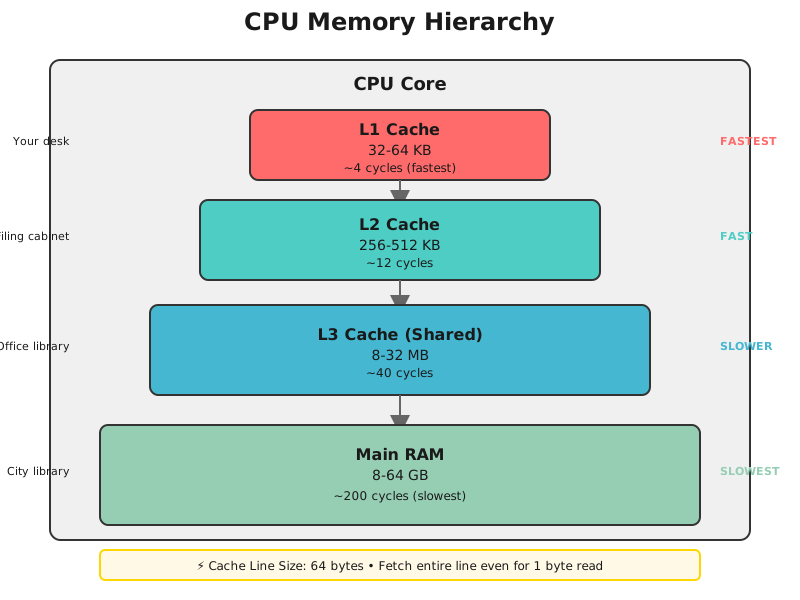
Think of this like:
- L1 Cache: Your desk drawer (instant access)
- L2 Cache: Your filing cabinet (quick walk)
- L3 Cache: Your office storage (down the hall)
- RAM: City library-and if you’re in Bangalore, may the traffic gods be with you 🙏 (~200 cycles, like driving through rush hour for a single piece of data)
The key insight: CPU fetches memory in cache lines of 64 bytes.
What is a Cache Line?
Think of a cache line like a shipping container. Even if you only order one book from Amazon, it arrives in a box. CPU works the same way-even if you only read 1 byte, it fetches 64 bytes.
// You access this byte:
int value = data[0];

// But the CPU fetches this entire cache line (64 bytes):
[data[0] data[1] data[2] ... data[15]]
Why 64 bytes?
- Optimized for typical access patterns (spatial locality)
- Programs often access nearby memory
- Amortizes the cost of fetching from RAM
A cache line is the unit of data transfer between RAM and CPU cache, typically 64 bytes. When you access 1 byte, the CPU fetches the entire 64-byte cache line containing it.
Cache Line Visualization
Let’s see how our pixel structs fit into cache lines:
struct GoodPixel {
    int id;          // 4 bytes
    uint8_t r, g, b; // 3 bytes
};  // Total: 8 bytes (with 1 byte padding)

struct BadPixel {
    uint8_t r;       // 1 byte
    int id;          // 4 bytes (+ 3 padding before)
    uint8_t g, b;    // 2 bytes
};  // Total: 12 bytes (with 5 bytes padding)
Cache Line (64 bytes) with GoodPixel (8 bytes each):
┌────────────────────────────────────────────────────────────────┐
│[P0][P1][P2][P3][P4][P5][P6][P7]                                │
│  8 pixels fit perfectly                                        │
└────────────────────────────────────────────────────────────────┘
Cache Line (64 bytes) with BadPixel (12 bytes each):
┌────────────────────────────────────────────────────────────────┐
│[P0......][P1......][P2......][P3......][P4......][P5..        │
│  Only 5 complete pixels, wasted 4 bytes                        │
└────────────────────────────────────────────────────────────────┘
Result: With good alignment, you get 60% more pixels per cache fetch.
Cache Misses: The Silent Killer
When the CPU needs data not in cache:
- Check L1 (~4 cycles) - Not there
- Check L2 (~12 cycles) - Not there
- Check L3 (~40 cycles) - Not there
- Fetch from RAM (~200 cycles) - Finally found!
Total: ~256 cycles wasted for a single cache miss.
Now imagine processing 1 million poorly-aligned pixels:
- More cache misses = More wasted cycles
- Each miss costs ~200 cycles
- Adds up to milliseconds of pure waiting
With good alignment:
- More data per cache line
- Fewer cache misses
- CPU stays busy doing actual work
Conclusion
Remember our library from the beginning? You’re the librarian, and your CPU is the researcher racing against the clock.
Every time you write a struct, you’re making a choice about how data lives in memory. A careless layout- char, int, char - scatters your data across cache lines, forcing your CPU to make extra trips to RAM. It’s like shelving one book across three different aisles.
But a thoughtful layout- int, char, char - puts everything in reach. The CPU grabs what it needs in one smooth motion. Your code runs faster.
Small decisions compound. One struct saves 4 bytes. A million structs save 4 MB. In a real-time application processing billions of pixels over five minutes, those savings become the difference between buttery 60 FPS and stuttering 25 FPS. Users feel it immediately.
When you run the benchmarks on your machine, your numbers will vary—modern CPUs are incredibly smart at hiding inefficiencies. But the fundamentals remain: better alignment means more data per cache line, fewer memory stalls, and less wasted bandwidth. The direction is always the same.
What we’ve covered:
- Why
sizeof()lies to you (padding!) - How CPUs read memory in chunks, not bytes
- The alignment rule: 4-byte int at addresses 0, 4, 8, 12…
- Real performance impact: 1.5-2x speedups from reordering
- AoS vs SoA for different workloads
- Cache hierarchies and why they matter
The one rule to remember: Order struct fields largest -> smallest. That simple habit can save gigabytes and buy you frames.
Your CPU will thank you. (:
References & Resources
Here are the resources that helped me understand these concepts deeply:
CPU Architecture & Memory Systems
-
What Every Programmer Should Know About Memory by Ulrich Drepper - The definitive guide to memory hierarchies, cache behavior, and NUMA systems
-
Gallery of Processor Cache Effects by Igor Ostrovsky - Interactive demonstrations of cache effects you can run and measure
Struct Layout & Alignment
- The Lost Art of Structure Packing by Eric S. Raymond - Practical guide to reducing struct sizes
- Data Structure Alignment - Wikipedia’s comprehensive coverage with architecture-specific details
SIMD & Performance
- Algorithmic Optimizations: How to Leverage SIMD - My article on SIMD vectorization and performance gains
- SIMD for C++ Developers by Konstantin - Practical SIMD programming guide
Related Articles
If you enjoyed this performance optimization deep-dive, you might also like:
-
Algorithmic Optimizations: How to Leverage SIMD - Deep dive into SIMD vectorization for performance optimization in WebAR engines, achieving 7x performance improvement through register-level parallelism.
-
Understanding Virtual and Physical Addresses in Operating Systems - A comprehensive guide to memory management, debugging techniques, and how modern operating systems handle memory through virtual and physical addresses.
If you found this article helpful, feel free to connect with me on X/Twitter or LinkedIn.